当外面的div设置了宽度,高度, 没有设置padding及border时, 里面的div设置margin-top无效, 如下:
 <style type="text/css">
		.top{width: 300px; height: 50px; background: #ddd;}
		.big{width: 300px; height: 200px; background: #eee; }
		.small{width: 100px; height: 100px; margin-top: 50px; background: #ccc;}
	</style>
    <div class="top">top</div>
	<div class="big">
		  <div class="small">small</div>
	</div>
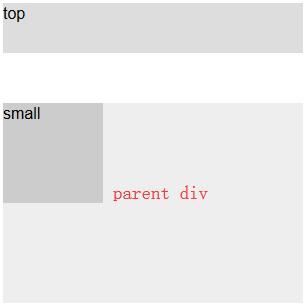
查资料给出的解释是:当两个容器嵌套时,如果外层容器和内层容器之间没有别的元素,浏览器会把内层元素的margin-top作用与父元素[注意: 父元素 没有设置 padding及border]
如图:
解决的办法有两个:
1、使用浮动来解决,即将子层CSS代码改为:
.small{width: 100px; height: 100px; margin-top: 50px; background: #ccc; float:left;}
2、使用padding-top来解决,即:
.big{width: 300px; height: 200px; background: #eee; padding-top:50px; }