无限分类作用不再赘述, 效果如下:
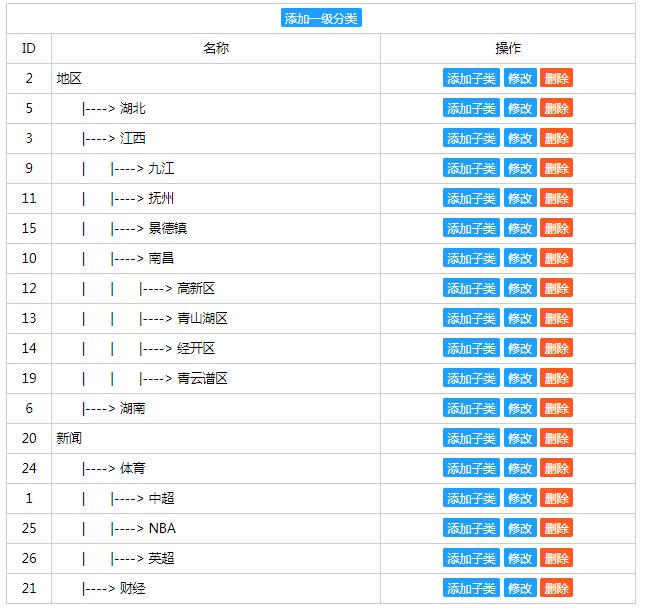
使用方法:
1, 将应用拷贝到项目目录下
2,在项目的setting文件中做两个设置
INSTALLED_APPS = [
    'django.contrib.admin',
    'django.contrib.auth',
    'django.contrib.contenttypes',
    'django.contrib.sessions',
    'django.contrib.messages',
    'django.contrib.staticfiles',
    'll'  # 无限分类应用 limitless 缩写  增加此行
]

STATIC_URL = '/static/'
STATICFILES_DIRS = [
    os.path.join(BASE_DIR,'ll/static')
    # 加载ll应用下的statics目录  增加这行
]
3, 在项目的url文件中做如下配置
urlpatterns = [
    path('admin/', admin.site.urls),
    path('ll/',include("ll.urls"))
    # 增加这行

]
4, 根据ll的modles.py中的模型类sorts 到数据库生成表
python manage.py makemigrations ll #生成表对象
python manage.py migrate ll #生成数据库中表
5, 访问地址:
域名/ll/list
效果如访问的第一个文件所示
下载文件:

主要文件:
1, 无限分类递归查询
from .models import sorts


class sortAll:
    sortList = []
    level = 0

    # 查询所有子类信息
    @classmethod
    def getChildren(cls, pid=0, space="", rs=[]):
        if not rs:
            rs = sorts.objects.filter(parentid=pid).order_by("orders")
            del cls.sortList[:]
            cls.level = 0
            # 每次调用之前,清空列表
        if rs:
            for dic in rs:
                if not cls.level:
                    cls.level = dic.level
                # 将开始的父级水平定义为第一级
                lev = dic.level  #表中级别
                if (lev == cls.level): #第一级
                    dic.space = ""
                elif (lev == cls.level + 1):
                    space = "  |---->"
                    dic.space = space
                else:
                    dic.space = space
                cls.sortList.append(dic)
                pid = dic.id
                rs = sorts.objects.filter(parentid=pid).order_by("orders")
                if rs:
                    cls.getChildren(pid, "  |" + space, rs)

        return cls.sortList

    @classmethod
    # selectName : select 的name属性值
    # pid        : 父级id
    # currentid  : 当前默认选中类别
    # top        : 是否显示顶级类别
    def selectTree(cls, pid=0, selectName="parentid", currentid=0, top=False):
        lists = cls.getChildren(pid)
        strs = '<select name="' + selectName + '">';
        if top:
            strs += '<option value="0">一级分类</option>'

        for row in lists:
            if (row.id == currentid):
                strs += '<option value="' + str(row.id) + '" selected>' + row.space + row.title + '</option>'
            else:
                strs += '<option value="' + str(row.id) + '">' + row.space + row.title + '</option>'
        strs += '</select>'

        return strs

    @classmethod
    def getParentName(cls, sortpath="", fuhao="->"):
        str = ""
        if sortpath:
            sortpath = sortpath[2:len(sortpath) - 1]
            list = sortpath.split(",")
            for index in range(len(list)):
                row = sorts.objects.get(id=list[index])
                if index == 0:
                    str += row.title
                else:
                    str += fuhao + row.title
        return str
2, 基于django模型视图的增删改操作
from django.shortcuts import render
from django.http import HttpResponse
from .models import sorts
from .sortTree import sortAll
from django.db.models import  F,Func,Value
from django.db.models.functions import Replace


def list(request):
    list_child = sortAll.getChildren(0)
    return render(request, "ll/list.html", {"list_children": list_child})
def add(request):
    if request.method == "GET":
       currentid = int(request.GET.get("parentid", 0))
       dict = {"selectTree":sortAll.selectTree(0,"parentid",currentid,True)}
       return render(request,"ll/add.html",dict)
    elif request.method == "POST":
       post = request.POST
       parentid = post.get("parentid",0)
       title    = post.get("title")
       ordders  = post.get("orders")
       if not title:
          return HttpResponse("<script>alert('类别名称不能为空');history.back();</script>")
       try:
          result = sorts.objects.get(parentid=parentid, title=title)
          if result:
             return HttpResponse("<script>alert('类别已经存在');history.back();</script>")
       except  sorts.DoesNotExist:
          pass
       # 设置level, sortpath信息begin
       level = 1
       sortpath = "0,"
       if parentid:
          # 最顶级时使用默认设置值, 否则根据父级来决定
          try:
             row = sorts.objects.values("level", "sortpath").get(id=parentid)
             level = row.get("level") + 1
             sortpath = row.get("sortpath")
          except sorts.DoesNotExist:
             pass

       data = {"title":title, "parentid":parentid, "level":level, "sortpath":sortpath, "orders":ordders}
       obj  = sorts.objects.create(**data)
       sortpath = obj.sortpath + str(obj.id) + ","
       sorts.objects.filter(id=obj.id).update(sortpath=sortpath)
       return HttpResponse("<script>alert('添加成功');location.href='/ll/list/';</script>")
def edit(request):
    if request.method == "GET":
       id = request.GET.get("id", 0)
       try:
          row = sorts.objects.get(id=id)
       except sorts.DoesNotExist:
          return HttpResponse("<script>alert('传递参数不正确, 找不到数据');history.back();</script>")
       else:
          selectTree = sortAll.selectTree(pid=0, selectName='parentid', currentid=row.parentid, top=True)
       return render(request, "ll/edit.html", {"row": row, "selectTree": selectTree})
    elif request.method == "POST":
       id = int(request.POST.get("id"))
       parentid = int(request.POST.get("parentid"))
       title = request.POST.get("title")
       orders = request.POST.get("orders")
       if not title:
          return HttpResponse("<script>alert('名称不能为空');history.back();</script>")
       # 判断同一个父类下不能有重复的名称
       try:
          rs = sorts.objects.exclude(id=id).get(parentid=parentid, title=title)
       except sorts.DoesNotExist:
          pass
       else:
          return HttpResponse("<script>alert('名称重复');history.back();</script>")

       # 获取原来id的sorthpath及parentid
       try:
          row = sorts.objects.get(id=id)
       except sorts.DoesNotExist:
          return HttpResponse("<script>alert('id参数错误');history.back();</script>")
       else:
          oldParentid = row.parentid
          oldSortPath = row.sortpath
          oldLevel = row.level

       # 获取现在id的父级的sorthpath
       nowParentidSortPath = ""
       if parentid:
          try:
             row1 = sorts.objects.values("sortpath", "level").get(id=parentid)
          except sorts.DoesNotExist:
             return HttpResponse("<script>alert('父类参数错误');history.back();</script>")
          else:
             nowParentidSortPath = row1.get("sortpath")
             nowLevel = row1.get("level")
          # 当前选择的父级id的sortpath

          row.title = title
          row.orders = orders

       if parentid == oldParentid:
          #  父类不变, 直接更新名称和排序就可以了
          row.save()
       elif oldSortPath in nowParentidSortPath:
          # 判断修改类别父类不能为原类别的子类
          return HttpResponse("<script>alert('不能选择自己或子级作为父类');history.back();</script>")
       elif parentid == 0:
          # 选择一级类别
          level = 1
          sortpath = "0," + str(id) + ","
          row.level = level
          row.sortpath = sortpath
          row.parentid = 0
          row.save()
          chaLevel = oldLevel - level
          # 更新所有子类的层级
          # sorts.objects.exclude(id=id).filter(sortpath__icontains=oldSortPath).
          # update(sortpath=Func(F('sortpath'), Value(oldSortPath), Value(sortpath), function='replace',),level = F("level") - chaLevel)
          sorts.objects.exclude(id=id).filter(sortpath__icontains=oldSortPath).update(
             sortpath=Replace('sortpath', Value(oldSortPath), Value(sortpath)),
             level=F("level") - chaLevel
          )
       else:
          sortpath = nowParentidSortPath + str(id) + ","
          level = nowLevel + 1
          chaLevel = oldLevel - level
          row.sortpath = sortpath
          row.level = level
          row.parentid = parentid
          row.save()
          sorts.objects.exclude(id=id).filter(sortpath__icontains=oldSortPath).update(
             sortpath=Replace('sortpath', Value(oldSortPath), Value(sortpath)),
             level=F("level") - chaLevel
          )
       return HttpResponse("<script>alert('修改成功');location.href='/ll/list/';</script>")


def delete(request):
   id = request.GET.get("id", 0)

   sorts.objects.filter(sortpath__icontains=str(id) + ",").delete()
   return HttpResponse("<script>alert('删除成功');location.href='/ll/list';</script>")
4, 无限分类表Sorts模型
from django.db import models

# 无限分类表
class sorts(models.Model):
    title = models.CharField(max_length=100)
    # 类别名称
    parentid = models.IntegerField(default=0)
    # 类别的 父 id
    sortpath = models.CharField(default='',blank=True,max_length=200)
    # 从父级第一级开始,每层的id, 包含当前id
    level = models.SmallIntegerField(default=1)
    # 从父级第一级开始,为第几级
    orders = models.IntegerField(default=1)
    # 同一级中的排序
    pic = models.CharField(default='',blank=True,max_length=200)